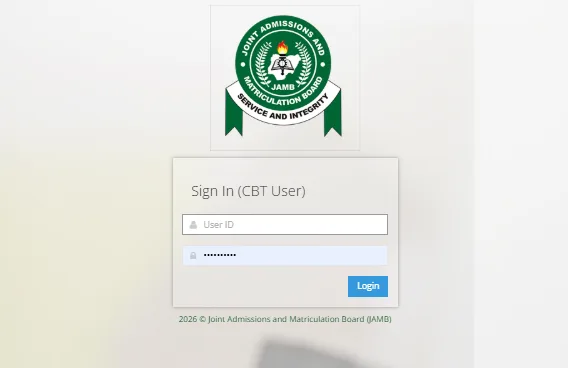
The JAMB admission letter is an important document for candidates who have been offered admission through the Joint Admissions and Matriculation Board (JAMB).
After receiving an admission offer, candidates may need to print their admission letter for school registration, clearance, scholarship applications and other official purposes. The admission letter contains important information about the candidate’s admission, including the institution and programme.
If you are looking for how to print your JAMB admission letter online, this guide explains the process in simple steps. It also covers the requirements, payment information, common problems and what to do if your admission letter is not available.
Important: JAMB may update its website and procedures from time to time. Always confirm the current requirements, fees and instructions on the official JAMB website before making a payment.
What Is a JAMB Admission Letter?
A JAMB admission letter is an official document that provides details of a candidate’s admission into a tertiary institution.
It can contain information such as:
- Candidate’s name
- JAMB registration number
- Institution
- Course or programme
- Admission type
- Academic session
- Registration information
Candidates who have been offered admission may need the document during their institution’s registration and clearance process.
It is therefore advisable to keep both a digital and printed copy after obtaining it.
Who Can Print a JAMB Admission Letter?
Generally, candidates who have been offered admission through the JAMB admission process may be able to access and print their admission letter.
This can include eligible:
- UTME candidates
- Direct Entry candidates
- Candidates admitted into universities
- Candidates admitted into polytechnics
- Candidates admitted into colleges of education
- Candidates admitted into other participating tertiary institutions
Your admission must be properly reflected in the JAMB system before the relevant admission letter can be generated.
What Do I Need to Print My JAMB Admission Letter?
Before starting the process, prepare the following:
- JAMB profile login details
- JAMB registration number
- Email address used for your JAMB profile
- Phone or computer with internet access
- A valid means of payment where applicable
- Printer access or a trusted business centre
You do not necessarily need to own a printer. If you have access to the online portal but cannot print the document yourself, you can download it and print it later.
How to Print JAMB Admission Letter Online
The process can be completed online through the official JAMB portal.
Step 1: Visit the Official JAMB Website
Start by visiting the official JAMB website.
Always check the website address carefully before entering your personal information.
Avoid using links from unknown blogs, WhatsApp messages or social media accounts when entering your JAMB login details.
Step 2: Log Into Your JAMB Profile
Locate the candidate login section and enter the details associated with your JAMB profile.
You may need to provide your:
- Email address
- Password
Make sure you enter the correct information.
If you have forgotten your password, use the official account-recovery option provided by JAMB rather than giving your details to another person.
Step 3: Locate the Admission Letter Option
After logging into your profile, look for the service related to Admission Letter.
The exact position or wording of the option may change when JAMB updates its portal.
Select the option that allows you to print or obtain your admission letter.
Step 4: Make the Required Payment
JAMB may require a payment before the admission letter can be accessed.
If a payment is required, carefully review:
- The amount displayed
- The payment reference
- Your candidate information
- The available payment method
Only make payment through the official JAMB platform.
Do not transfer money to an individual’s personal account because someone claims they can print the document for you.
Step 5: Provide the Requested Details
Depending on the current portal procedure, you may be asked to confirm your candidate information.
Check the details carefully before proceeding.
If the information displayed is incorrect, do not simply continue without investigating the issue.
Step 6: Generate Your Admission Letter
Once the process has been completed successfully, follow the instructions on the portal to generate your admission letter.
You may be given an option to view, download or print the document.
Step 7: Print the Document
If you have a printer connected to your computer, select the print option and print the admission letter.
If you are using a smartphone, you may be able to save the document and print it later.
It is advisable to keep a PDF or digital copy in a safe location.
Can I Print My JAMB Admission Letter With My Phone?
Yes, you can access the JAMB portal using a smartphone.
However, the exact options available may depend on the current JAMB portal and your device.
If the document is generated as a PDF, you can save it to your phone and print it later.
You can also send the file to a trusted printing or business centre.
When using a public computer, remember to log out of your JAMB account after completing the process.
Can I Print My JAMB Admission Letter at a Cyber Café?
Yes. If you do not have a personal computer or printer, you can visit a reputable business centre or cyber café for assistance.
However, be careful when using public computers.
Follow these safety tips:
- Enter your password yourself.
- Do not save your password in the browser.
- Do not allow strangers to photograph your login details.
- Log out when you finish.
- Check that the downloaded document belongs to you.
- Take the printed document before leaving.
You should not need to give a business-centre operator permanent access to your JAMB account.
How Much Is JAMB Admission Letter Printing?
The amount payable can change depending on JAMB’s current fees and portal procedures.
Rather than relying on old figures published on blogs or social media, check the amount displayed directly on the official JAMB portal when you request the service.
This is important because fees and online-service procedures may be reviewed from time to time.
Also remember that a printing centre may charge an additional service fee for internet access or printing.
What If My JAMB Admission Letter Is Not Showing?
Sometimes a candidate may log into the portal and discover that the admission letter is not available.
There can be several reasons.
Your Admission Has Not Been Processed
Your institution may have offered admission, but the admission may not yet have been fully reflected in the JAMB system.
Your Admission Status Is Still Pending
Check your JAMB admission status before attempting to print the letter.
Incorrect Login Details
Make sure you are accessing the correct JAMB profile.
Portal or Technical Issues
The website may temporarily experience technical problems.
Admission Information Needs Updating
If your institution has recently released admission, there may be a delay before all relevant information becomes available.
What Should I Do If My Admission Letter Is Not Available?
If you cannot access your admission letter, first confirm your admission status.
Check whether your admission has been officially recorded.
You can then:
- Confirm your JAMB registration details.
- Check your admission status.
- Confirm your institution and programme.
- Try accessing the portal again later.
- Check for official JAMB announcements.
- Contact the appropriate JAMB support channel if the issue continues.
Do not pay an unofficial agent to “upload” or “activate” your admission letter.
What If My Admission Details Are Wrong?
If the information on your admission letter does not match your actual admission, do not ignore the problem.
For example, check carefully if there is an issue with:
- Your name
- Institution
- Course
- Admission type
- Registration number
- Academic session
Some changes may require an official correction process.
Contact the relevant institution or JAMB support channel for guidance instead of attempting to edit the document yourself.
Never alter an official admission letter using a photo-editing application.
Can I Print My JAMB Admission Letter More Than Once?
It is advisable to keep a digital copy of your admission letter once you obtain it.
If you need another physical copy later, follow the current instructions provided through the official JAMB portal.
Keeping a PDF or other digital copy can save you time if you lose the printed document.
Why Is the JAMB Admission Letter Important?
The admission letter can be required during different stages of your academic journey.
For example, it may be requested during:
- School clearance
- Registration
- Verification
- Scholarship applications
- Student documentation
- NYSC-related processes where applicable
- Other official academic procedures
The exact documents required depend on the institution and purpose.
It is therefore a good idea to keep your admission letter safely.
JAMB Admission Letter vs School Admission Letter
These two documents should not be confused.
JAMB Admission Letter
This is issued through the JAMB system and reflects the admission information recognised by JAMB.
School Admission Letter
An institution may also provide its own admission letter or admission documentation.
Depending on the school, students may need both documents during registration or clearance.
Always follow the specific documentation requirements provided by your institution.
What If I Changed My Institution or Course?
Candidates who changed their institution or course during the admission process should pay particular attention to the information displayed on their JAMB profile.
Before printing your admission letter, verify that the institution and programme shown are the ones associated with your final admission.
If you notice a discrepancy, seek clarification from the appropriate official channel.
Do not print a document with incorrect admission information and assume that the issue will correct itself later.
Can Direct Entry Candidates Print a JAMB Admission Letter?
Direct Entry candidates may also need admission documentation through JAMB where applicable.
The exact procedure can differ depending on the candidate’s admission status and the current JAMB process.
Direct Entry candidates should therefore follow the instructions available on their JAMB profile and official JAMB announcements.
Common Problems When Printing JAMB Admission Letter
1. Forgotten Password
Use JAMB’s official password-recovery process.
2. Admission Not Showing
Confirm that your admission has been properly processed.
3. Payment Issue
Check your transaction status before attempting another payment.
4. Poor Internet Connection
Use a stable connection and try again.
5. Website Is Slow
The portal may be experiencing heavy traffic. Wait and try again later.
6. Printer Problem
Save the document as a PDF and print it from another device.
How to Save Your JAMB Admission Letter
After generating the admission letter, it is a good idea to keep multiple copies.
You can:
- Save the PDF on your phone.
- Save a copy on your computer.
- Back it up to cloud storage.
- Send a copy to your personal email.
- Print at least one physical copy.
Do not rely on a single physical copy.
Important Safety Tips
Your JAMB profile contains personal information, so you should protect it.
Never Share Your Password
JAMB login details should remain private.
Avoid Fake Websites
Only use the official JAMB website for sensitive activities.
Do Not Pay Unofficial Agents
If a payment is required, make it through the approved JAMB process.
Check Your Details
Before downloading or printing the admission letter, confirm that the information belongs to you.
Keep Your Receipt
If you make an official payment, save the transaction information and receipt.
Frequently Asked Questions (FAQs)
How can I print my JAMB admission letter online?
Log into your JAMB profile through the official JAMB website, locate the admission-letter service, follow the instructions and complete any required payment before generating and printing the document.
Can I print my JAMB admission letter with my phone?
Yes. You can access the JAMB portal from a smartphone and, where supported, download the admission letter for printing.
Do I need a printer to get my admission letter?
No. You can save the document digitally and print it later at a trusted business centre or printing shop.
How much does JAMB admission letter printing cost?
The applicable JAMB service fee can change. Check the amount displayed on the official JAMB portal when requesting the admission letter.
What if my admission letter is not available?
First check your admission status and confirm that your admission has been properly processed. If the issue continues, follow the official JAMB support procedure.
Can I print my admission letter more than once?
Keep a digital copy of your admission letter. If another copy is required, follow the current procedure provided by JAMB.
What information is contained in a JAMB admission letter?
It generally contains important admission information such as the candidate’s name, registration details, institution and programme.
Is a JAMB admission letter the same as my school’s admission letter?
No. They can be separate documents. Your institution may issue its own admission documentation in addition to the JAMB admission letter.
Conclusion
Printing your JAMB admission letter online is an important step after receiving an admission offer.
The process is generally straightforward: access your JAMB profile through the official portal, locate the admission-letter service, follow the instructions provided and generate the document.
Before printing, always check that your name, institution, programme and other important information are correct.
If you encounter a problem, do not immediately pay an agent who claims to have a special way of fixing your account. Start by checking your admission status, reviewing the information on your JAMB profile and using the appropriate official support channel.
Finally, keep both a digital and physical copy of your admission letter. You may need the document during school registration, clearance and other academic processes.
The safest approach is to use only the official JAMB platform for admission-letter services and protect your login details throughout the process.

Leave a Comment